


Built using the latest Microsoft APIs and capabilities, the integration goes beyond legacy two-way document syncing. Lawyers can access SharePoint directly from Lawcadia, open Microsoft Office files in desktop or online applications, and manage versions in both SharePoint and Lawcadia.
This helps legal teams reduce duplication, align access controls, avoid version conflicts and keep documents connected to the relevant matter.
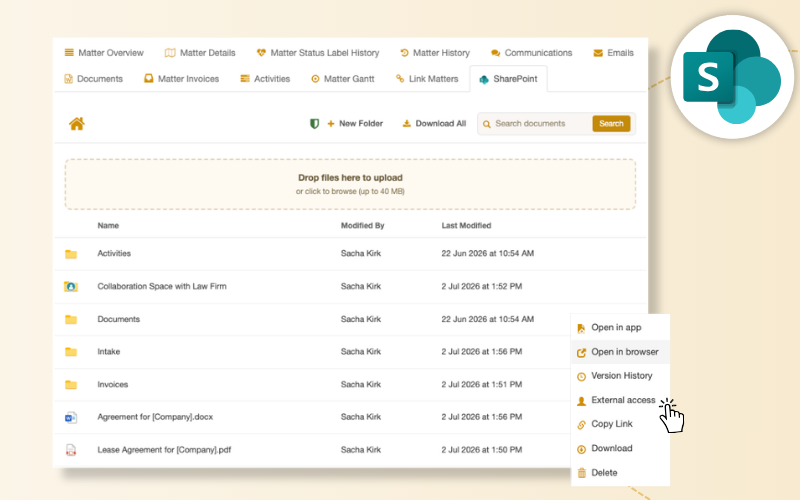

Legal teams benefit from the structure, controls and visibility of the Lawcadia platform alongside Microsoft’s co-authoring and collaboration capabilities. The result is less manual handling, consistent governance and confidence that documents are stored where they should be, without slowing teams down.




Lawcadia’s SharePoint integration respects and preserves existing Microsoft sensitivity labels, allowing legal teams to manage matters, documents and workflows in Lawcadia while maintaining the organisation’s existing information governance controls.
Documents remain managed within the client’s Microsoft 365 environment, helping legal teams collaborate efficiently while supporting security and compliance requirements.
Frequently Asked Questions
What is the Lawcadia and SharePoint integration?
The integration connects Lawcadia with Microsoft SharePoint for teams that use SharePoint as their enterprise records system. Documents and records are automatically maintained in SharePoint while legal work is received, managed and reported on within Lawcadia. This means legal teams benefit from the structure, controls and visibility of Lawcadia alongside SharePoint’s co-authoring and collaboration capabilities, without having to choose between the two.
How is this integration different from basic document syncing approaches?
Lawcadia’s SharePoint integration is built using the latest Microsoft APIs and capabilities, which distinguishes it from older legacy syncing approaches that frequently cause version conflict issues. The integration is designed specifically for how modern legal teams work, prioritising accuracy, speed and reliability rather than simply replicating files between systems.
Does the integration require documents to be filed manually in both systems?
No. The integration handles this automatically. When documents are created or updated within Lawcadia, they are maintained in SharePoint without any additional manual filing step. This removes the duplication of effort that teams often face when operating across two separate systems, and provides confidence that documents are stored correctly in the organisation’s system of record.
Can teams still use SharePoint's collaboration features?
Yes. The integration is designed to preserve the collaborative capabilities that SharePoint provides, including co-authoring, version history and Microsoft 365 compatibility. Users can open Microsoft Office files directly from Lawcadia and edit using desktop or online applications. Versions are saved automatically and can be accessed in both SharePoint and Lawcadia.
Does Lawcadia keep SharePoint permissions aligned with matter access?
Yes. Lawcadia matter permissions can be pushed to the relevant SharePoint matter folder, helping ensure access controls remain consistent across both systems. Users can also share individual documents or folders with specific internal or external users, giving teams flexibility to collaborate without opening access to the full matter.
Who is the SharePoint integration best suited to?
The SharePoint integration is designed for corporate and government legal teams that have SharePoint as their established system of record. It allows these teams to adopt Lawcadia’s full operational platform without disrupting their existing document infrastructure or requiring a migration to a new storage environment.
How does the SharePoint integration fit within Lawcadia's broader document management options?
Lawcadia offers a range of document management options to suit different organisational contexts. These include Lawcadia’s native document management with Outlook and Word integrations, the iManage integration for teams with sophisticated document management requirements, the Content Manager integration for government teams with records management obligations, and now the SharePoint integration for teams where SharePoint is the enterprise records system. Organisations can select the option that best matches their existing technology and governance requirements.
Does Lawcadia support Microsoft Purview sensitivity labels?
Yes. Lawcadia’s SharePoint integration respects and preserves Microsoft sensitivity labels applied through Microsoft Purview Information Protection.
Where organisations use sensitivity labels and information protection controls within Microsoft 365, Lawcadia works with documents stored in the client’s SharePoint environment while maintaining the organisation’s existing governance settings. This helps legal teams manage matters and collaborate without bypassing established information protection controls.